Image:ThunderHawk Split Screen Magnifier View.PNG
From Wikipedia, the free encyclopedia
No higher resolution available.
ThunderHawk_Split_Screen_Magnifier_View.PNG (240 × 320 pixels, file size: 79 KB, MIME type: image/png)
[edit] Summary
| Non-free / fair use media rationale for ThunderHawk (web browser) | |
|---|---|
| Description |
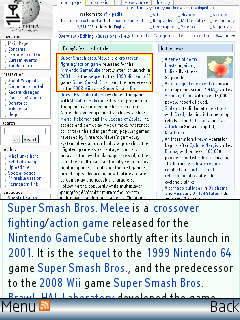
The patented split-screen zoom-out mode in ThunderHawk showing both the overview and zoomed-in view of Wikipedia Main page. |
| Source |
Took the screenshot myself using a licensed version of the software. |
| Article | |
| Portion used |
Shows the page layout and minimum number of software UI components. |
| Low resolution? |
yes |
| Purpose of use |
To illustrate split-screen viewing technology |
| Replaceable? |
no |
| Other information | The text in focus in the image is from the featured article section: Super Smash Bros. Melee displayed on Wikipedia Main page. |
[edit] Licensing:
 |
This is a screenshot of copyrighted computer software, and the copyright for its contents is most likely held by the author(s) or the company that created the software. It is believed that the use of a limited number of web-resolution screenshots:
…qualifies as fair use under United States copyright law. Any other uses of this image, on Wikipedia or elsewhere, may be copyright infringement. See Wikipedia:Non-free content for more information.  If this is a screenshot of free software (GPL, BSD, etc.) do not use this template! Use the license tag that correspond to the license instead, optionally alongside {{Free screenshot}} to categorize as a free screenshot. If this is a screenshot of free software (GPL, BSD, etc.) do not use this template! Use the license tag that correspond to the license instead, optionally alongside {{Free screenshot}} to categorize as a free screenshot. |
File history
Click on a date/time to view the file as it appeared at that time.
| Date/Time | Dimensions | User | Comment | |
|---|---|---|---|---|
| current | 12:05, 14 May 2008 | 240×320 (79 KB) | ForedIndia (Talk | contribs) | ({{Non-free use rationale |Article=ThunderHawk (web browser) |Description=The patented split-screen zoom-out mode in ThunderHawk showing both the overview and zoomed-in view of Wikipedia Main page. |Source=Took the screenshot myself using a licensed versio) |
- Search for duplicate files
- Edit this file using an external application
See the setup instructions for more information.


